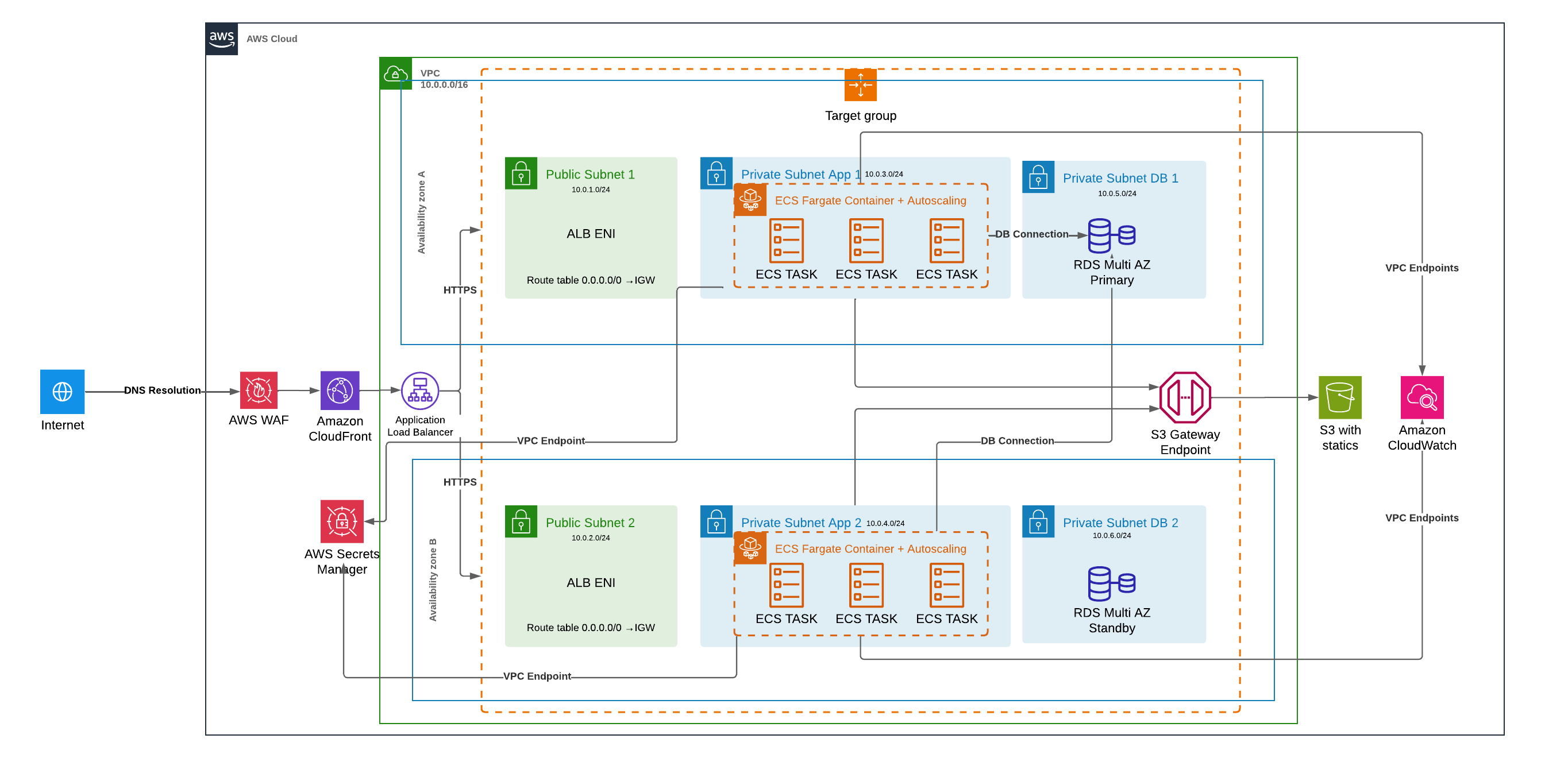
This project provisions, with Terraform, the complete AWS infrastructure for a containerized Django application, together with the pipeline that delivers it. The application runs on ECS Fargate in private subnets without internet access, stores its data in a Multi-AZ RDS PostgreSQL database and is published exclusively through CloudFront, protected by AWS WAF. Every commit to the main branch goes through a CodePipeline that tests the Docker image, runs the database migrations and performs a zero-downtime rolling deployment with automatic rollback.
The application itself is intentionally simple (a CRUD of items), because the focus is on the infrastructure and the release process: network isolation, least-privilege access, secrets that never reach the Terraform state, immutable deployments and a cost analysis that supports the main architectural decisions.
Highlights
Single entry point: CloudFront and WAF in front of the whole application; the load balancer only accepts traffic coming from CloudFront.
No internet access for the workloads: private subnets without NAT gateways, with AWS services reached through VPC endpoints.
Safe releases: immutable images, migrations executed once before the rollout and automatic rollback through the ECS deployment circuit breaker.
Secrets out of the state: ephemeral variables and write-only arguments keep passwords out of the Terraform state file.
The infrastructure is distributed across two availability zones and organized in layers, each one reachable only from the layer in front of it:
CloudFront + WAF: the only public entry point. Serves static files from S3 and forwards every other request to the load balancer, after inspection by the WAF rules.
ALB: Application Load Balancer in the public subnets, accepting HTTPS connections only from CloudFront.
ECS Fargate: Django containers in private subnets, scaling from 2 to 6 tasks based on CPU usage.
RDS: PostgreSQL in Multi-AZ mode, with a synchronous standby in the second availability zone.
VPC Endpoints: private access from the containers to ECR, CloudWatch Logs, Secrets Manager and S3.
A user request reaches CloudFront, passes through the WAF and, if it is not a static file, is forwarded over HTTPS to the ALB with a secret header that proves its origin. The ALB distributes it among the healthy ECS tasks, which query the database in the isolated subnets. The containers have no route to the internet: images, logs, secrets and static files travel through VPC endpoints, without leaving the AWS network.
Code Structure
The repository brings together the application, the infrastructure and the delivery process, so a single commit can change any of them:
app/: Django application, Dockerfile and automated tests.
ci/: build specifications and the deploy script executed by CodeBuild.
infra/: Terraform code: the root configuration, the bootstrap of the remote state and the modules.
The infrastructure is split into ten modules, each one responsible for a part of the architecture:
VPC Module: subnets in each availability zone, route tables and VPC endpoints.
ALB Module: load balancer, target group and the rules that restrict access to CloudFront.
CDN Module: CloudFront distribution, Origin Access Control and the optional DNS record.
WAF Module: web ACL with managed rules, rate limiting and geographic blocking.
S3 Module: private bucket for the static files.
ECR Module: image repository and its lifecycle policy.
ECS Module: cluster, task definition, service, autoscaling and IAM roles.
RDS Module: PostgreSQL instance, parameter group and monitoring.
Secrets Module: Secrets Manager secrets used by the application.
Pipeline Module: CodePipeline, CodeBuild projects and their IAM roles.
Inside each module, there is a main.tf file that defines the resources, a variables.tf file that defines the variables, and an outputs.tf file that exposes the values used by the other modules.
Backend Configuration
The Terraform state is stored remotely in an S3 bucket, with versioning and encryption. Unlike the Infra as Code project, this one does not need a DynamoDB table for locking: since Terraform 1.10, the S3 backend supports native locking through a lock file stored in the same bucket (use_lockfile). The configuration includes:
Bootstrap: the state bucket is created by a separate configuration (infra/bootstrap), applied only once with local state.
Partial configuration: the backend "s3" block is empty in the code; bucket, key and region come from a backend.hcl file during terraform init, so the same code can be reused in other accounts or environments.
Providers: a second AWS provider fixed in us-east-1 is declared, because CloudFront-scoped resources, such as the WAF web ACL, only exist in that region.
Default tags: Project, Environment and ManagedBy tags are applied automatically to every resource.
The state bucket, created by the bootstrap configuration:
The providers and the partial backend configuration of the main stack:
versions.tf
terraform{# Write-only arguments (password_wo, secret_string_wo) require Terraform >= 1.11.required_version=">= 1.11"required_providers{aws={source="hashicorp/aws"version="~> 6.0"}random={source="hashicorp/random"version="~> 3.6"}}# Partial configuration: values come from backend.hcl (see backend.hcl.example).backend "s3" {}}provider "aws" {region= var.aws_region
default_tags{tags= local.tags
}}# CloudFront-scoped resources (WAF web ACL, viewer certificate) must live in us-east-1.provider "aws" {alias="us_east_1"region="us-east-1"default_tags{tags= local.tags
}}
The backend values, provided with terraform init -backend-config=backend.hcl:
backend.hcl.example
# Copy to backend.hcl and run: terraform init -backend-config=backend.hclbucket="example-terraform-state"key="django-app/prod/terraform.tfstate"region="us-east-1"encrypt=trueuse_lockfile=true# S3 native state locking, no DynamoDB table needed
VPC Module
The VPC module builds the network where everything runs. Its most important decision is that the private subnets have no route to the internet: there is no NAT gateway. The containers only need to talk to a few AWS services, so they reach them through VPC endpoints, which keeps all traffic inside the AWS network and closes the path a compromised container could use to download tools or exfiltrate data. Subnets are created in blocks for each availability zone, with their CIDRs calculated from the VPC range.
Features
VPC: DNS support and hostnames enabled, required by the private DNS of the interface endpoints.
Subnets: public (ALB), app (ECS) and database (RDS) subnets in each availability zone.
Route Tables: a public route table with a route to the internet gateway and a private one without any default route.
VPC Endpoints: a gateway endpoint for S3 and interface endpoints for ECR, CloudWatch Logs and Secrets Manager.
Resources
1. Locals, VPC and Internet Gateway
Resource: aws_vpc / aws_internet_gateway
cidrsubnet(): calculates one /24 per subnet and availability zone, in blocks: public, app and database (10.0.1-2, 10.0.3-4 and 10.0.5-6 with two AZs).
enable_dns_hostnames / enable_dns_support: enabled so the interface endpoints can resolve the AWS service names to private IPs.
vpc/main.tf
locals{az_count= length(var.availability_zones)
# One /24 per subnet and AZ, in blocks: public, then app, then database.# With 2 AZs and 10.0.0.0/16: public 10.0.1-2, app 10.0.3-4, db 10.0.5-6.public_cidrs=[for i in range(local.az_count) : cidrsubnet(var.cidr_block, 8, 1 + i)]app_cidrs=[for i in range(local.az_count) : cidrsubnet(var.cidr_block, 8, 1 + local.az_count + i)]db_cidrs=[for i in range(local.az_count) : cidrsubnet(var.cidr_block, 8, 1 + 2 * local.az_count + i)]}resource "aws_vpc""main"{cidr_block= var.cidr_block
enable_dns_hostnames=trueenable_dns_support=truetags={Name="${var.name}-vpc"}}resource "aws_internet_gateway""main"{vpc_id= aws_vpc.main.id
tags={Name="${var.name}-igw"}}
2. Subnets
Resource: aws_subnet
count: one subnet of each tier per availability zone in the availability_zones list.
cidr_block: taken from the CIDR lists calculated in the locals.
tags: name and tier (public, app or db) for identification.
public: routes 0.0.0.0/0 to the internet gateway and is used only by the ALB subnets.
private: has no default route, so the app and database subnets cannot reach the internet.
vpc/main.tf
resource "aws_route_table""public"{vpc_id= aws_vpc.main.id
route{cidr_block="0.0.0.0/0"gateway_id= aws_internet_gateway.main.id
}tags={Name="${var.name}-public"}}# No default route: private subnets have no internet access (no NAT gateway).# AWS services are reached through the VPC endpoints below.resource "aws_route_table""private"{vpc_id= aws_vpc.main.id
tags={Name="${var.name}-private"}}resource "aws_route_table_association""app"{count= local.az_count
subnet_id= aws_subnet.app[count.index].id
route_table_id= aws_route_table.private.id
}
4. S3 Gateway Endpoint
Resource: aws_vpc_endpoint
vpc_endpoint_type: Gateway, a free endpoint added as a route in the private route table.
policy: allows only the AWS bucket where ECR stores image layers and the application's static files bucket.
vpc/main.tf
# Gateway endpoint (free). Used to pull image layers from ECR and to upload# static files to the application bucket.resource "aws_vpc_endpoint""s3"{vpc_id= aws_vpc.main.id
service_name="com.amazonaws.${var.region}.s3"vpc_endpoint_type="Gateway"route_table_ids=[aws_route_table.private.id]policy= jsonencode({Version="2012-10-17"Statement=[{# ECR stores image layers in this AWS-owned bucketSid="ECRImageLayers"Effect="Allow"Principal="*"Action=["s3:GetObject"]Resource=["arn:aws:s3:::prod-${var.region}-starport-layer-bucket/*"]},
{Sid="StaticFiles"Effect="Allow"Principal="*"Action=["s3:GetObject",
"s3:PutObject",
"s3:DeleteObject",
"s3:ListBucket",
"s3:GetBucketLocation"]Resource=["arn:aws:s3:::${var.static_bucket_name}",
"arn:aws:s3:::${var.static_bucket_name}/*"]}]})
tags={Name="${var.name}-s3"}}
5. Interface Endpoints
Resource: aws_vpc_endpoint / aws_security_group
for_each: one endpoint for each service Fargate needs: ecr.api, ecr.dkr, logs and secretsmanager.
private_dns_enabled: the standard service names resolve to the endpoint's private IPs, so the application needs no changes.
security_group_ids: accepts HTTPS only from the app subnets.
vpc/main.tf
# Interface endpoints required by Fargate tasks without internet access:# pull images (ecr.api, ecr.dkr), ship logs (logs) and read secrets (secretsmanager).resource "aws_vpc_endpoint""interface"{for_each= toset(["ecr.api", "ecr.dkr", "logs", "secretsmanager"])
vpc_id= aws_vpc.main.id
service_name="com.amazonaws.${var.region}.${each.key}"vpc_endpoint_type="Interface"subnet_ids= aws_subnet.app[*].id
security_group_ids=[aws_security_group.vpc_endpoints.id]private_dns_enabled=truetags={Name="${var.name}-${replace(each.key,".","-")}"}}resource "aws_security_group""vpc_endpoints"{name_prefix="${var.name}-vpce-"vpc_id= aws_vpc.main.id
description="Interface VPC endpoints"ingress{description="HTTPS from the app subnets"from_port=443to_port=443protocol="tcp"cidr_blocks= local.app_cidrs
}tags={Name="${var.name}-vpce"}lifecycle{create_before_destroy=true}}
Variables and Outputs
The module receives the VPC CIDR, the list of availability zones, the region and the static files bucket name. It outputs the subnet IDs and CIDRs of each tier, the endpoints security group and the S3 prefix list, used by the ALB, ECS and RDS modules.
ALB Module
The Application Load Balancer distributes the requests among the ECS tasks and checks their health. Since an ALB always has a public DNS name, it would be possible to call it directly and bypass CloudFront and the WAF. To prevent this, the module combines two layers: at the network level, the security group only accepts the IP ranges used by CloudFront; at the application level, the listener only forwards requests that contain a secret header added by CloudFront, returning 403 to everything else.
Features
Security Group: HTTPS ingress only from the AWS-managed CloudFront prefix list, and egress only to the application port in the app subnets.
Application Load Balancer: internet-facing ALB in the public subnets, dropping invalid HTTP headers.
Target Group: IP targets, required by Fargate, with health checks on /healthz/.
Listener and Rule: HTTPS listener with a TLS 1.3 policy, a default 403 response and a rule that forwards requests carrying the secret header.
Resources
1. Security Group
Resource: aws_security_group
prefix_list_ids: com.amazonaws.global.cloudfront.origin-facing, the list of CloudFront IPs, kept up to date by AWS.
ingress: only port 443: the prefix list counts as about 55 rules against the security group quota, and the HTTP to HTTPS redirect is done by CloudFront.
egress: only the application port (8000) to the app subnets.
alb/main.tf
# AWS-managed list of the IP ranges CloudFront uses to reach originsdata "aws_ec2_managed_prefix_list""cloudfront"{name="com.amazonaws.global.cloudfront.origin-facing"}resource "aws_security_group""alb"{name_prefix="${var.name}-alb-"description="ALB: HTTPS from CloudFront only"vpc_id= var.vpc_id
# The prefix list counts as ~55 rules against the security group quota (60),# which is why only port 443 is opened. HTTP -> HTTPS happens at CloudFront.ingress{description="HTTPS from CloudFront"from_port=443to_port=443protocol="tcp"prefix_list_ids=[data.aws_ec2_managed_prefix_list.cloudfront.id]}egress{description="Traffic and health checks to the ECS tasks"from_port= var.target_port
to_port= var.target_port
protocol="tcp"cidr_blocks= var.app_subnet_cidrs
}tags={Name="${var.name}-alb"}lifecycle{create_before_destroy=true}}
2. Load Balancer and Target Group
Resource: aws_lb / aws_lb_target_group
drop_invalid_header_fields: discards requests with malformed headers.
target_type: ip, because each Fargate task has its own network interface.
deregistration_delay: 30 seconds to finish in-flight requests when a task is replaced.
health_check: /healthz/ every 30 seconds; 2 successes mark a target as healthy and 3 failures as unhealthy.
ssl_policy: ELBSecurityPolicy-TLS13-1-2-2021-06, accepting only TLS 1.2 and 1.3.
default_action: fixed 403 response for any request that did not come from CloudFront.
condition: forwards to the target group only when the X-Origin-Verify header has the expected value.
alb/main.tf
resource "aws_lb_listener""https"{load_balancer_arn= aws_lb.main.arn
port=443protocol="HTTPS"ssl_policy="ELBSecurityPolicy-TLS13-1-2-2021-06"certificate_arn= var.certificate_arn
# Anything that did not come through CloudFront is rejecteddefault_action{type="fixed-response"fixed_response{content_type="text/plain"message_body="Forbidden"status_code="403"}}}resource "aws_lb_listener_rule""from_cloudfront"{listener_arn= aws_lb_listener.https.arn
priority=1condition{http_header{http_header_name= var.origin_verify_header_name
values=[var.origin_verify_header_value]}}action{type="forward"target_group_arn= aws_lb_target_group.app.arn
}}
The secret value is generated in the root configuration with the random provider and passed both to the ALB and to the CloudFront distribution:
main.tf
# Shared secret that CloudFront adds to every origin request. The ALB only# forwards requests carrying it, so the load balancer cannot be reached directly.resource "random_password""origin_verify"{length=32special=false}
Variables and Outputs
The module receives the VPC, the public subnets, the app subnet CIDRs, the certificate ARN and the secret header value, marked as sensitive. It outputs the ALB DNS name, used as the CloudFront origin, its security group and the target group ARN.
CDN Module
The CDN module creates the CloudFront distribution, the only public address of the application. It has two origins: the S3 bucket, which serves the static files, and the ALB, which receives everything else. Static files are cached at the edge, while application requests are never cached and are forwarded with all headers, cookies and query strings. As the static files are served under the application's own domain, CORS is not needed, and the bucket stays private, readable only by this distribution.
Features
Two origins: the ALB (default behavior) and the static files bucket (/static/*).
Managed policies: AWS-managed cache and origin request policies, with caching disabled for the application and optimized for static files.
Origin Access Control: CloudFront signs its requests to S3, and the bucket policy only accepts requests from this distribution.
Custom domain: ACM certificate, TLS 1.2 minimum, HTTP/2 and HTTP/3, and optional alias records in Route 53.
Managed-CachingDisabled: used by the application, whose responses are dynamic.
Managed-AllViewer: forwards the Host header to the ALB, so CloudFront validates the ALB certificate against the application domain.
signing_behavior: always, every request to S3 is signed with SigV4.
cdn/main.tf
data "aws_cloudfront_cache_policy""disabled"{name="Managed-CachingDisabled"}data "aws_cloudfront_cache_policy""optimized"{name="Managed-CachingOptimized"}# Forwards Host, cookies, query strings and headers to the ALB. Because the# Host header is forwarded, CloudFront validates the ALB certificate against# domain_name, so the ALB listener uses a certificate for the same domain.data "aws_cloudfront_origin_request_policy""all_viewer"{name="Managed-AllViewer"}resource "aws_cloudfront_origin_access_control""static"{name="${var.name}-static"description="Access to the static files bucket"origin_access_control_origin_type="s3"signing_behavior="always"signing_protocol="sigv4"}
2. Distribution
Resource: aws_cloudfront_distribution
web_acl_id: associates the WAF web ACL, so every request is inspected.
custom_header: adds the X-Origin-Verify secret to the requests sent to the ALB.
origin_protocol_policy: https-only, traffic between CloudFront and the ALB is also encrypted.
ordered_cache_behavior: /static/* goes to S3 with caching; the default behavior goes to the ALB without caching.
viewer_protocol_policy: redirects HTTP to HTTPS.
cdn/main.tf
resource "aws_cloudfront_distribution""main"{enabled=trueis_ipv6_enabled=truehttp_version="http2and3"price_class= var.price_class
aliases=[var.domain_name]web_acl_id= var.web_acl_arn
comment= var.name
origin{origin_id="alb"domain_name= var.alb_dns_name
custom_origin_config{http_port=80https_port=443origin_protocol_policy="https-only"origin_ssl_protocols=["TLSv1.2"]}custom_header{name= var.origin_verify_header_name
value= var.origin_verify_header_value
}}origin{origin_id="static"domain_name= var.static_bucket_regional_domain_name
origin_access_control_id= aws_cloudfront_origin_access_control.static.id
}# Application: dynamic, never cacheddefault_cache_behavior{target_origin_id="alb"viewer_protocol_policy="redirect-to-https"allowed_methods=["GET", "HEAD", "OPTIONS", "PUT", "POST", "PATCH", "DELETE"]cached_methods=["GET", "HEAD"]cache_policy_id= data.aws_cloudfront_cache_policy.disabled.id
origin_request_policy_id= data.aws_cloudfront_origin_request_policy.all_viewer.id
compress=true}# Static files: served from S3 and cached at the edgeordered_cache_behavior{path_pattern="/static/*"target_origin_id="static"viewer_protocol_policy="redirect-to-https"allowed_methods=["GET", "HEAD"]cached_methods=["GET", "HEAD"]cache_policy_id= data.aws_cloudfront_cache_policy.optimized.id
compress=true}restrictions{geo_restriction{restriction_type="none"}}viewer_certificate{acm_certificate_arn= var.certificate_arn
ssl_support_method="sni-only"minimum_protocol_version="TLSv1.2_2021"}}
The module receives the domain, the certificate, the web ACL ARN, the ALB DNS name, the secret header value and the static bucket attributes. It outputs the distribution ARN and its domain name, used to configure DNS when Route 53 is not managed by the project.
WAF Module
AWS WAF inspects every request before it reaches the application. Since the web ACL is associated with CloudFront, it must have the CLOUDFRONT scope and be created in us-east-1, which is why the module receives the provider configured for that region. The rules combine AWS-managed rule groups, updated by AWS as new threats appear, with custom rules for rate limiting and geographic blocking.
Features
Common Rule Set: protection against common exploits, such as cross-site scripting and path traversal (OWASP Top 10).
Known Bad Inputs: blocks request patterns known to exploit vulnerabilities, such as Log4j.
SQLi Rule Set: detects SQL injection attempts in query strings, bodies and headers.
Rate limiting: blocks IPs that exceed 2000 requests in a 5-minute window.
Geo blocking: blocks a configurable list of countries; an empty list disables the rule.
Resources
1. Web ACL
Resource: aws_wafv2_web_acl
scope: CLOUDFRONT, required for the association with a distribution.
default_action: allows the requests that do not match any blocking rule.
override_action: none, keeping the actions defined by each managed rule group.
dynamic "rule": creates the geo blocking rule only when the country list is not empty.
visibility_config: publishes metrics and request samples of each rule to CloudWatch.
waf/main.tf
# Attached to the CloudFront distribution, so it inspects every request to the# application (CloudFront is the only path to the ALB).resource "aws_wafv2_web_acl""main"{name="${var.name}-waf"scope="CLOUDFRONT"default_action{allow{}}rule{name="AWSManagedRulesCommonRuleSet"priority=1override_action{none{}}statement{managed_rule_group_statement{name="AWSManagedRulesCommonRuleSet"vendor_name="AWS"}}visibility_config{cloudwatch_metrics_enabled=truemetric_name="CommonRuleSet"sampled_requests_enabled=true}}rule{name="AWSManagedRulesKnownBadInputsRuleSet"priority=2override_action{none{}}statement{managed_rule_group_statement{name="AWSManagedRulesKnownBadInputsRuleSet"vendor_name="AWS"}}visibility_config{cloudwatch_metrics_enabled=truemetric_name="KnownBadInputs"sampled_requests_enabled=true}}rule{name="AWSManagedRulesSQLiRuleSet"priority=3override_action{none{}}statement{managed_rule_group_statement{name="AWSManagedRulesSQLiRuleSet"vendor_name="AWS"}}visibility_config{cloudwatch_metrics_enabled=truemetric_name="SQLiRuleSet"sampled_requests_enabled=true}}# Requests per IP within a 5-minute windowrule{name="RateLimitPerIP"priority=4action{block{}}statement{rate_based_statement{limit= var.rate_limit
aggregate_key_type="IP"}}visibility_config{cloudwatch_metrics_enabled=truemetric_name="RateLimitPerIP"sampled_requests_enabled=true}} dynamic "rule"{for_each= length(var.blocked_countries) > 0 ? [1] : []content{name="GeoBlock"priority=5action{block{}}statement{geo_match_statement{country_codes= var.blocked_countries
}}visibility_config{cloudwatch_metrics_enabled=truemetric_name="GeoBlock"sampled_requests_enabled=true}}}visibility_config{cloudwatch_metrics_enabled=truemetric_name="${var.name}-waf"sampled_requests_enabled=true}}
Variables and Outputs
The module receives the name prefix, the rate limit and the list of blocked countries, and outputs the web ACL ARN used by the CDN module.
ECS Module
The ECS module runs the application. Fargate removes the need to manage servers: each task has its own network interface in the private subnets, its own IAM role, and receives its secrets from Secrets Manager at startup. The task definition is shared by two owners: Terraform defines everything except the image (CPU, memory, variables, roles), and the pipeline registers a new revision with the image of each commit. For this reason, the service ignores changes to the task definition and to the number of tasks, which are controlled by the pipeline and by autoscaling.
Features
Cluster: ECS cluster with Container Insights and a log group with 30-day retention.
IAM Roles: an execution role, used by the ECS agent to pull the image and read secrets, and a task role, used by the application to write static files to S3.
Security Group: accepts traffic only from the ALB and allows outbound traffic only to the VPC endpoints, S3 and the database subnets.
Task Definition: container with environment variables, secrets, log configuration and a health check.
Service: rolling deployments that keep 100% of the capacity, with an automatic rollback circuit breaker.
Autoscaling: target tracking that keeps the average CPU at 70%, between 2 and 6 tasks.
execution: AWS-managed policy to pull images and write logs, plus secretsmanager:GetSecretValue restricted to the two application secrets.
task: read, write and delete permissions only on the static files bucket.
ecs/main.tf
# Used by the ECS agent: pull the image, write logs, read secretsresource "aws_iam_role""execution"{name="${var.name}-task-execution"assume_role_policy= data.aws_iam_policy_document.ecs_tasks_assume.json
}resource "aws_iam_role_policy""execution_secrets"{name="read-app-secrets"role= aws_iam_role.execution.id
policy= jsonencode({Version="2012-10-17"Statement=[{Effect="Allow"Action=["secretsmanager:GetSecretValue"]Resource= var.secret_arns
}]})
}# Used by the application code: upload static files to S3resource "aws_iam_role""task"{name="${var.name}-task"assume_role_policy= data.aws_iam_policy_document.ecs_tasks_assume.json
}resource "aws_iam_role_policy""task_static_files"{name="static-files"role= aws_iam_role.task.id
policy= jsonencode({Version="2012-10-17"Statement=[{Effect="Allow"Action=["s3:ListBucket"]Resource= var.static_bucket_arn
},
{Effect="Allow"Action=["s3:GetObject", "s3:PutObject", "s3:DeleteObject"]Resource="${var.static_bucket_arn}/*"}]})
}
3. Security Group
Resource: aws_security_group
ingress: application port only from the ALB security group.
egress: HTTPS to the endpoints security group and to the S3 prefix list, and PostgreSQL to the database subnets. DNS needs no rule, since traffic to the VPC resolver is not filtered by security groups.
ecs/main.tf
# DNS needs no rule: traffic to the VPC resolver is not filtered by security groups.resource "aws_security_group""tasks"{name_prefix="${var.name}-tasks-"vpc_id= var.vpc_id
description="ECS tasks"ingress{description="Application port from the ALB"from_port= var.container_port
to_port= var.container_port
protocol="tcp"security_groups=[var.alb_security_group_id]}egress{description="HTTPS to the interface VPC endpoints"from_port=443to_port=443protocol="tcp"security_groups=[var.vpc_endpoints_security_group_id]}egress{description="HTTPS to S3 through the gateway endpoint"from_port=443to_port=443protocol="tcp"prefix_list_ids=[var.s3_prefix_list_id]}egress{description="PostgreSQL"from_port=5432to_port=5432protocol="tcp"cidr_blocks= var.db_subnet_cidrs
}tags={Name="${var.name}-tasks"}lifecycle{create_before_destroy=true}}
4. Task Definition
Resource: aws_ecs_task_definition
network_mode: awsvpc, required by Fargate.
environment / secrets: plain variables and values injected from Secrets Manager, generated from maps with for expressions.
logConfiguration: awslogs driver, sending stdout to CloudWatch Logs.
healthCheck: calls /healthz/ inside the container every 30 seconds.
ecs/main.tf
# The pipeline registers new revisions of this family with the image of each# commit. Terraform owns everything else (env vars, CPU, memory, roles): a# change here creates a new revision that the next pipeline run builds upon.resource "aws_ecs_task_definition""app"{family= var.name
network_mode="awsvpc"requires_compatibilities=["FARGATE"]cpu= var.cpu
memory= var.memory
execution_role_arn= aws_iam_role.execution.arn
task_role_arn= aws_iam_role.task.arn
runtime_platform{operating_system_family="LINUX"cpu_architecture="X86_64"}container_definitions= jsonencode([{name= local.container_name
image= var.container_image
essential=trueportMappings=[{containerPort= var.container_port
protocol="tcp"}]environment=[for k, v in var.environment : {name= k, value= v }]secrets=[for k, v in var.secrets : {name= k, valueFrom= v }]logConfiguration={logDriver="awslogs"options={"awslogs-group"= aws_cloudwatch_log_group.app.name
"awslogs-region"= var.region
"awslogs-stream-prefix"="app"}}healthCheck={command=["CMD-SHELL", "curl -fs http://localhost:${var.container_port}/healthz/ || exit 1"]interval=30timeout=5retries=3startPeriod=30}}])
}
5. Service
Resource: aws_ecs_service
deployment_minimum_healthy_percent: 100, new tasks are started before the old ones are stopped.
deployment_circuit_breaker: rolls the service back to the previous revision if the new tasks do not become healthy.
assign_public_ip: false, the tasks only have private IPs.
ignore_changes: desired_count belongs to autoscaling and task_definition to the pipeline.
ecs/main.tf
resource "aws_ecs_service""app"{name= var.name
cluster= aws_ecs_cluster.main.id
task_definition= aws_ecs_task_definition.app.arn
desired_count= var.min_capacity
launch_type="FARGATE"propagate_tags="SERVICE"network_configuration{subnets= var.subnet_ids
security_groups=[aws_security_group.tasks.id]assign_public_ip=false}load_balancer{target_group_arn= var.target_group_arn
container_name= local.container_name
container_port= var.container_port
}# Rolling update that never drops below the current capacitydeployment_minimum_healthy_percent=100deployment_maximum_percent=200health_check_grace_period_seconds=60# Failed deployment (tasks not becoming healthy) rolls back automaticallydeployment_circuit_breaker{enable=truerollback=true}lifecycle{# desired_count is owned by autoscaling, task_definition by the pipelineignore_changes=[desired_count, task_definition]}depends_on=[aws_iam_role_policy_attachment.execution]}
The module receives the network information, the target group, the initial image, CPU and memory, the capacity limits, environment variables and secrets. It outputs the cluster and service names, the task definition family, the container name, the tasks security group and the IAM roles, used by the RDS and pipeline modules.
RDS Module
The RDS module provisions the PostgreSQL database. It runs in Multi-AZ mode: AWS keeps a synchronous standby in the second availability zone and performs an automatic failover in case of failure. The database is only reachable from the ECS tasks' security group, and the master password is sent through a write-only argument, so it is never recorded in the Terraform state.
Features
Security Group: PostgreSQL access only from the application security group.
Parameter Group: enables pg_stat_statements and logs slow queries, schema changes and connections.
Instance: PostgreSQL 17 with encrypted gp3 storage, storage autoscaling, Multi-AZ, backups and monitoring.
security_groups: the ingress source is the ECS tasks security group instead of a CIDR block.
subnet_ids: the isolated database subnets, one in each availability zone.
rds/main.tf
resource "aws_security_group""rds"{name_prefix="${var.name}-rds-"vpc_id= var.vpc_id
description="PostgreSQL: access from the application tasks only"ingress{description="PostgreSQL from the ECS tasks"from_port=5432to_port=5432protocol="tcp"security_groups= var.allowed_security_group_ids
}tags={Name="${var.name}-rds"}lifecycle{create_before_destroy=true}}resource "aws_db_subnet_group""main"{name= var.name
subnet_ids= var.subnet_ids
}
2. Parameter Group
Resource: aws_db_parameter_group
family: derived from the engine version, e.g. postgres17.
log_statement: ddl, records schema changes without logging every query.
log_min_duration_statement: logs queries slower than 1 second.
rds/main.tf
resource "aws_db_parameter_group""postgresql"{name="${var.name}-postgres${local.engine_major_version}"family="postgres${local.engine_major_version}"parameter{name="shared_preload_libraries"value="pg_stat_statements"apply_method="pending-reboot"}# Log schema changes and slow queries (>1s), not every statementparameter{name="log_statement"value="ddl"}parameter{name="log_min_duration_statement"value="1000"}parameter{name="log_connections"value="1"}parameter{name="log_disconnections"value="1"}lifecycle{create_before_destroy=true}}
3. Instance
Resource: aws_db_instance
password_wo / password_wo_version: write-only password: sent to AWS but not stored in the state. Changing the version applies a new password.
multi_az: synchronous standby with automatic failover.
storage_encrypted / max_allocated_storage: encrypted storage that grows automatically from 20 GB up to 100 GB.
performance_insights_enabled / monitoring_interval: query performance analysis and OS metrics every 60 seconds.
deletion_protection / final_snapshot_identifier: protection against accidental deletion and a final snapshot when the instance is removed.
The module receives the network, the allowed security groups, the credentials and the instance settings. It outputs the database address, port and name, which become environment variables of the containers.
Supporting Modules
Three smaller modules complete the infrastructure, providing the storage for static files, the image registry and the secrets used by the application.
S3 Module: private, encrypted and versioned bucket for static files, with ownership enforced by the bucket owner and old versions expiring after 7 days.
ECR Module: image repository with immutable tags, vulnerability scanning on push and a lifecycle policy that keeps the last 20 images.
Secrets Module: Secrets Manager secrets for the Django SECRET_KEY and the database credentials, written with write-only arguments.
Static files bucket:
s3/main.tf
# Django static files. Private bucket: read by CloudFront through Origin# Access Control (policy in the cdn module), written by `collectstatic`.resource "aws_s3_bucket""static"{bucket= var.bucket_name
tags={Name= var.bucket_name
}}resource "aws_s3_bucket_public_access_block""static"{bucket= aws_s3_bucket.static.id
block_public_acls=trueblock_public_policy=trueignore_public_acls=truerestrict_public_buckets=true}# collectstatic overwrites files on every release; keep old versions for a weekresource "aws_s3_bucket_lifecycle_configuration""static"{bucket= aws_s3_bucket.static.id
rule{id="expire-noncurrent-versions"status="Enabled"filter{}noncurrent_version_expiration{noncurrent_days=7}}}
Image repository. Immutable tags guarantee that each task definition revision always points to the same image, which makes rollbacks reliable:
ecr/main.tf
resource "aws_ecr_repository""app"{name= var.name
# Images are tagged <commit SHA>-<build number> and never overwritten,# so every task definition revision points to a fixed image.image_tag_mutability="IMMUTABLE"image_scanning_configuration{scan_on_push=true}}resource "aws_ecr_lifecycle_policy""app"{repository= aws_ecr_repository.app.name
policy= jsonencode({rules=[{rulePriority=1description="Delete untagged images after 1 day"selection={tagStatus="untagged"countType="sinceImagePushed"countUnit="days"countNumber=1}action={type="expire"}},
{rulePriority=2description="Keep the last ${var.images_to_keep} images (rollback window)"selection={tagStatus="any"countType="imageCountMoreThan"countNumber= var.images_to_keep
}action={type="expire"}}]})
}
Database credentials secret. The values come from ephemeral variables and are only sent again when secrets_version changes:
secrets/main.tf
resource "aws_secretsmanager_secret""db_credentials"{name="${var.name}/db-credentials"description="PostgreSQL credentials used by the application"recovery_window_in_days= var.recovery_window_in_days
}resource "aws_secretsmanager_secret_version""db_credentials"{secret_id= aws_secretsmanager_secret.db_credentials.id
secret_string_wo= jsonencode({username= var.db_username
password= var.db_password
})
secret_string_wo_version= var.secrets_version
}
Main File
The main.tf file connects all the modules. It defines the naming prefix and the tags, generates the CloudFront secret header and passes the outputs of each module to the others, such as the tasks security group to the RDS module and the database address to the ECS module. Terraform resolves the dependencies between the modules automatically from these references.
Every commit to the main branch triggers a release in AWS CodePipeline, with three stages. The main idea is that the tested image is the same image that is deployed, and that the database is migrated only once, before the new version receives traffic. The pipeline runs in QUEUED mode, so a release is never interrupted halfway through its migrations.
Source: downloads the code through an AWS CodeConnections connection with GitHub (Bitbucket and GitLab are also supported).
Build: builds the Docker image, runs the tests and Django's deployment checks inside it, and pushes it to ECR tagged with the commit hash and the build number.
Deploy: registers a new task definition revision with the image, runs migrations and collectstatic as a one-off ECS task, updates the service and waits until the rollout completes or fails.
The pipeline. The image URI produced by the Build stage is passed to the Deploy stage as a pipeline variable:
pipeline/main.tf
resource "aws_codepipeline""main"{name= var.name
role_arn= aws_iam_role.pipeline.arn
pipeline_type="V2"# A release is never interrupted halfway through its migrationsexecution_mode="QUEUED"artifact_store{location= aws_s3_bucket.artifacts.bucket
type="S3"}stage{name="Source"action{name="Source"category="Source"owner="AWS"provider="CodeStarSourceConnection"version="1"output_artifacts=["source"]configuration={ConnectionArn= aws_codeconnections_connection.source.arn
FullRepositoryId= var.repository_id
BranchName= var.branch_name
}}}stage{name="Build"action{name="TestAndBuildImage"category="Build"owner="AWS"provider="CodeBuild"version="1"input_artifacts=["source"]namespace="Build"configuration={ProjectName= aws_codebuild_project.build.name
}}}stage{name="Deploy"action{name="MigrateAndDeploy"category="Build"owner="AWS"provider="CodeBuild"version="1"input_artifacts=["source"]configuration={ProjectName= aws_codebuild_project.deploy.name
EnvironmentVariables= jsonencode([{name="IMAGE_URI"value="#{Build.IMAGE_URI}"type="PLAINTEXT"}])
}}}depends_on=[aws_iam_role_policy.pipeline]}
The Build stage. The image is pushed in the build phase because CodeBuild also runs the post_build phase when the build fails:
ci/buildspec-build.yml
# Build stage: test the image that will be shipped, then push it to ECR.version:0.2env:exported-variables:- IMAGE_URI
phases:pre_build:commands:- aws ecr get-login-password --region "$AWS_DEFAULT_REGION" | docker login --username AWS --password-stdin "${ECR_REPOSITORY_URL%%/*}"
# Commit SHA + build number: tags are immutable, so re-running a commit needs a new tag- IMAGE_URI="$ECR_REPOSITORY_URL:$(echo "$CODEBUILD_RESOLVED_SOURCE_VERSION" | cut -c 1-7)-$CODEBUILD_BUILD_NUMBER"
- echo "Image $IMAGE_URI"
build:commands:- docker build -t "$IMAGE_URI" app
# Tests and Django's deployment checklist run inside the image itself.# SQLite keeps the build independent from the VPC.->- docker run --rm
-e SECRET_KEY="ci-only-$(head -c 48 /dev/urandom | base64 | tr -dc 'a-zA-Z0-9')"
-e DATABASE_URL=sqlite:////tmp/ci.sqlite3
-e ALLOWED_HOSTS=example.com
"$IMAGE_URI"
sh -c "python manage.py test --noinput && python manage.py check --deploy --fail-level WARNING"
# Pushed here and not in post_build: post_build also runs when the build phase fails- docker push "$IMAGE_URI"
The deploy script. It creates the new revision from the latest one, which includes the Terraform configuration, runs the migrations before updating the service and checks the rollout state of that specific revision, since the circuit breaker may roll it back:
ci/deploy.sh
#!/usr/bin/env bash# Releases IMAGE_URI to the ECS service:# 1. registers a new task definition revision with the new image# 2. runs migrations + collectstatic as a one-off task, before any traffic moves# 3. points the service at the new revision and waits for the rollout## Required env: IMAGE_URI CLUSTER SERVICE TASK_FAMILY CONTAINER_NAME SUBNETS SECURITY_GROUPset -euo pipefail
echo"==> Registering task definition for $IMAGE_URI"# Latest ACTIVE revision of the family = Terraform's configuration + previous imageaws ecs describe-task-definition --task-definition "$TASK_FAMILY" --query taskDefinition \| jq --arg image "$IMAGE_URI" --arg name "$CONTAINER_NAME"'
.containerDefinitions |= map(if .name == $name then .image = $image else . end)
| del(.taskDefinitionArn, .revision, .status, .requiresAttributes,
.compatibilities, .registeredAt, .registeredBy)'\> /tmp/task-definition.json
TASK_DEFINITION_ARN=$(aws ecs register-task-definition \ --cli-input-json file:///tmp/task-definition.json \ --query taskDefinition.taskDefinitionArn --output text)echo" $TASK_DEFINITION_ARN"echo"==> Running migrations"# Schema changes must stay compatible with the version still serving traffic# (expand/contract), since old tasks keep running until the rollout finishes.OVERRIDES=$(jq -n --arg name "$CONTAINER_NAME"'{containerOverrides: [{
name: $name,
command: ["sh", "-c", "python manage.py migrate --noinput && python manage.py collectstatic --noinput"]
}]}')TASK_ARN=$(aws ecs run-task \ --cluster "$CLUSTER"\ --task-definition "$TASK_DEFINITION_ARN"\ --launch-type FARGATE \ --started-by "codebuild-release"\ --network-configuration "awsvpcConfiguration={subnets=[$SUBNETS],securityGroups=[$SECURITY_GROUP],assignPublicIp=DISABLED}"\ --overrides "$OVERRIDES"\ --query 'tasks[0].taskArn' --output text)echo" $TASK_ARN"aws ecs wait tasks-stopped --cluster "$CLUSTER" --tasks "$TASK_ARN"EXIT_CODE=$(aws ecs describe-tasks --cluster "$CLUSTER" --tasks "$TASK_ARN"\ --query "tasks[0].containers[?name=='$CONTAINER_NAME'].exitCode | [0]" --output text)if[["$EXIT_CODE"!="0"]];thenecho"Migration task failed (exit code: $EXIT_CODE). Logs: CloudWatch, stream app/$CONTAINER_NAME/${TASK_ARN##*/}">&2exit1fiecho"==> Updating service $SERVICE"aws ecs update-service --cluster "$CLUSTER" --service "$SERVICE"\ --task-definition "$TASK_DEFINITION_ARN"> /dev/null
# The circuit breaker rolls back failed deployments, so "stable" alone is not# enough: wait until the rollout of *this* revision completes or fails.for_in$(seq190);doSTATE=$(aws ecs describe-services --cluster "$CLUSTER" --services "$SERVICE"\ --query "services[0].deployments[?taskDefinition=='$TASK_DEFINITION_ARN'].rolloutState | [0]"\ --output text)case"$STATE"in COMPLETED)echo"==> Deployed $IMAGE_URI";exit0;; FAILED)echo"Deployment failed and was rolled back">&2;exit1;; *)sleep10;;esacdoneecho"Timed out waiting for the deployment">&2exit1
Each CodeBuild project has its own role. The deploy role can only run tasks of this task definition family in this cluster, update this service and pass the two ECS roles:
pipeline/main.tf
resource "aws_iam_role_policy""deploy"{name="deploy"role= aws_iam_role.deploy.id
policy= jsonencode({Version="2012-10-17"Statement=[{Effect="Allow"Action=["logs:CreateLogStream", "logs:PutLogEvents"]Resource="${aws_cloudwatch_log_group.codebuild.arn}:*"},
{Effect="Allow"Action=["s3:GetObject", "s3:GetObjectVersion"]Resource="${aws_s3_bucket.artifacts.arn}/*"},
{# These actions do not support resource-level permissionsEffect="Allow"Action=["ecs:DescribeTaskDefinition", "ecs:RegisterTaskDefinition"]Resource="*"},
{Effect="Allow"Action=["ecs:RunTask"]Resource= local.task_definition_arn
Condition={ArnEquals={"ecs:cluster"= local.cluster_arn }}},
{Effect="Allow"Action=["ecs:DescribeTasks"]Resource="arn:aws:ecs:${var.region}:${var.account_id}:task/${var.ecs_cluster_name}/*"},
{Effect="Allow"Action=["ecs:UpdateService", "ecs:DescribeServices"]Resource= local.service_arn
},
{Effect="Allow"Action=["iam:PassRole"]Resource= var.task_role_arns
Condition={StringEquals={"iam:PassedToService"="ecs-tasks.amazonaws.com"}}}]})
}
Application
The Django application was adapted to run behind CloudFront and the ALB, in containers that can be replaced at any time. All configuration comes from environment variables, and the image does not run migrations at startup.
Dockerfile: slim Python image, non-root user and Gunicorn as the server.
Health check: a middleware answers /healthz/ before the host validation and the HTTPS redirect, since health checks use the task IP and plain HTTP.
Static files: uploaded to S3 with a content hash in the file name, so a release never serves stale files from the CloudFront cache.
Security: HTTPS redirect, HSTS, secure cookies and CSRF protection on the API, enabled when DEBUG is off.
Dockerfile:
app/Dockerfile
FROM python:3.12-slimENV PYTHONDONTWRITEBYTECODE=1 \ PYTHONUNBUFFERED=1WORKDIR /app# curl is used by the ECS container health checkRUN apt-get update \ && apt-get install -y --no-install-recommends curl \ && rm -rf /var/lib/apt/lists/*COPY requirements.txt .RUN pip install --no-cache-dir -r requirements.txtCOPY . .RUN useradd --system --create-home appUSER appEXPOSE 8000# Migrations and collectstatic are not run here: with several tasks starting at# once they would race. The pipeline runs them once per release (ci/deploy.sh).CMD ["gunicorn", "app.wsgi:application", \"--bind", "0.0.0.0:8000", \"--workers", "3", \"--timeout", "60", \"--access-logfile", "-"]
Health check middleware. It only checks that the process is alive: checking the database here would make the ALB remove every task during an RDS failover.
app/app/middleware.py
from django.http import JsonResponse
classHealthCheckMiddleware:"""Answers /healthz/ before the rest of the middleware stack runs.
ALB and container health checks send the task's private IP (or localhost)
as Host and use plain HTTP, so a normal request would fail ALLOWED_HOSTS
validation or be redirected to HTTPS.
Liveness only: checking the database here would make the ALB drain every
task during an RDS failover, turning a short blip into a full outage.
"""def__init__(self, get_response): self.get_response = get_response
def__call__(self, request):if request.path =="/healthz/":return JsonResponse({"status":"healthy"})return self.get_response(request)
Static files configuration:
app/app/settings.py
# Static files## In AWS, `collectstatic` (run by the release task) uploads the files to S3# under static/, and CloudFront serves them from the application domain at# /static/* — same origin, no CORS, cached at the edge. The manifest storage# adds a content hash to every file name (app.3f2a1b.js), so a release never# serves stale cached assets and no CloudFront invalidation is needed.STATIC_URL ="/static/"STATIC_ROOT = BASE_DIR /"staticfiles"STORAGES ={"default":{"BACKEND":"django.core.files.storage.FileSystemStorage"},"staticfiles":{"BACKEND":"django.contrib.staticfiles.storage.StaticFilesStorage"},}if os.getenv("USE_S3","false").lower()=="true": STORAGES["staticfiles"]={"BACKEND":"storages.backends.s3.S3ManifestStaticStorage","OPTIONS":{"bucket_name": os.environ["AWS_STORAGE_BUCKET_NAME"],"region_name": os.getenv("AWS_REGION","us-east-1"),"location":"static","custom_domain": os.getenv("STATIC_CUSTOM_DOMAIN"),"querystring_auth":False,},}
Production security settings:
app/app/settings.py
# Security (production only)## TLS terminates at CloudFront and again at the ALB, which sets# X-Forwarded-Proto. Health checks never get here (HealthCheckMiddleware).ifnot DEBUG: SECURE_PROXY_SSL_HEADER =("HTTP_X_FORWARDED_PROTO","https") SECURE_SSL_REDIRECT =True SECURE_HSTS_SECONDS =31536000 SECURE_HSTS_INCLUDE_SUBDOMAINS =True SESSION_COOKIE_SECURE =True CSRF_COOKIE_SECURE =True
Tests
The project is validated at two levels: the Terraform code, before it is applied, and the application, inside the image that will be deployed.
Terraform fmt
The terraform fmt -check command verifies that all the files follow the standard Terraform style.
Terraform validate
The terraform validate command checks the syntax and the internal consistency of the configuration, including the rules for ephemeral variables and write-only arguments.
Terraform plan
The terraform plan command shows the actions Terraform will perform before anything is changed in the account.
Application tests
The Django test suite covers the API, input validation, health checks and CSRF protection. It runs in the pipeline inside the built image, together with manage.py check --deploy, which validates the production security settings. Example:
app/core/tests.py
classCsrfTests(TestCase):defsetUp(self): self.client = HttpsClient(enforce_csrf_checks=True)deftest_write_without_token_is_rejected(self): response = self.client.post( reverse("items_list"), data=json.dumps({"name":"x"}), content_type="application/json") self.assertEqual(response.status_code,403)deftest_write_with_token_from_home_page(self): page = self.client.get(reverse("home")).wsgi_request
token = self.client.cookies["csrftoken"].value
# Browsers send Origin on fetch() POST; it must match the site's own origin origin =f"{page.scheme}://{page.get_host()}" response = self.client.post( reverse("items_list"), data=json.dumps({"name":"x"}), content_type="application/json", HTTP_X_CSRFTOKEN=token, HTTP_ORIGIN=origin,) self.assertEqual(response.status_code,201)
Deployment
The infrastructure is created in three steps. First, the bootstrap configuration creates the state bucket. Then, the backend and the variables are configured, with the secrets provided as environment variables. Finally, terraform init and terraform apply create the infrastructure.
After the apply, the connection with GitHub must be approved once in the AWS console, and the first execution of the pipeline builds and deploys the application. From then on, each commit to the main branch is released automatically.
Cost Analysis
The estimated cost of the infrastructure running 24/7 in us-east-1 is about $208 per month with 2 tasks and $352 with 6 tasks. Fargate is the largest item, followed by the VPC endpoints and RDS. For this reason, the environment is not kept running.
ECS Fargate: $72 to $216 per month (2 to 6 tasks with 1 vCPU and 2 GB).
VPC Endpoints: $58 per month (4 interface endpoints in 2 availability zones).
RDS PostgreSQL: $31 per month (db.t3.micro Multi-AZ).
ALB: $22 per month.
WAF: $11 per month.
Others: CloudWatch, CI/CD, Secrets Manager, ECR and S3, about $13 per month. CloudFront stays within the free tier.
VPC Endpoints vs NAT Gateways
Two NAT gateways would cost about $66 per month, close to the $58 of the endpoints. The decision was based mainly on security, since without NAT the containers cannot reach the internet, and on data processing, which costs $0.045/GB through NAT and $0.01/GB through endpoints. The full analysis, including cost reduction options such as Fargate Spot and Savings Plans, is available in the repository: docs/cost-analysis.md